

This page is a list of frequently asked questions (FAQs) from Candidates of the NL Provincial Nominee Program (NLPNP). In order to view the answer to the listed questions, click on the desired question and the answer will be displayed. In order to view the other categories of FAQs, please go to our General FAQ Page.
Glossary:
NLPNP: Newfoundland and Labrador Provincial Nominee Program
EOI: Expression of Interest
ITA: Invitation to Apply
OIM: Office of Immigration and Multiculturalism
IPDO: Immigration Program Development Officer
IRCC: Immigration, Refugees and Citizenship Canada
PR: Permanent Residence
1. How do I know if I'm eligible for NLPNP?
To check if you are eligible for the NLPNP, information can be found here: NL Provincial Nominee Program (NLPNP) Overview. Note that OIM cannot provide an assessment of your eligibility for the NLPNP.
2. Who can I contact for technical support with the immigration portal?
For technical assistance with the Immigration Accelerator Portal contact OIMDigitalSystems@gov.nl.ca
3. How do I reset my password on my Immigration Accelerator account?
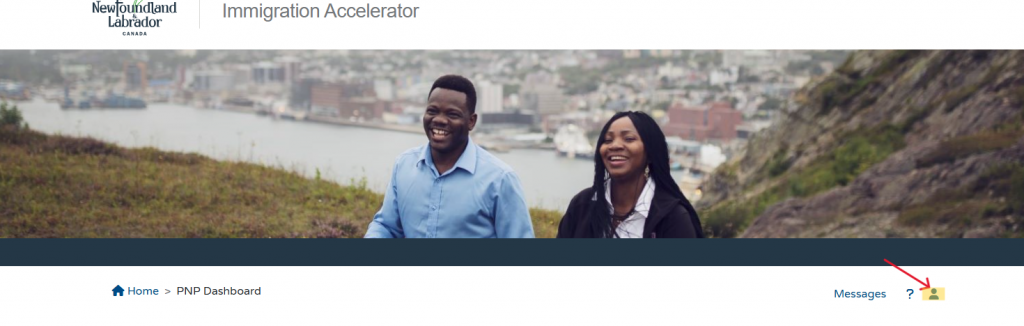
To update/reset your password, select the person icon to bring you to the “My Profile” section of the Homepage.
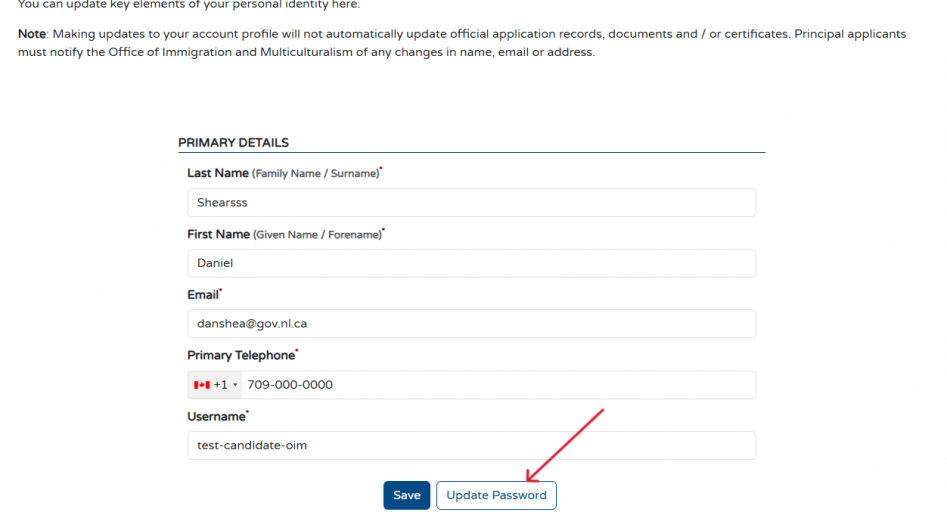
Once you open the “My Profile” section, you can click the “Update Password” button to reset your password.
4. I received an ITA for the Express Entry program after submitting my EOI but I realized I am not actually eligible for the Express Entry stream. What should I do?
OIM advises that you proceed with your application through your approved EOI, but you must contact your IPDO or pnp@gov.nl.ca immediately. Information on Program switching can be found here: Policy Addressing Program Switching.
5. How do I proceed in uploading the requested documents if an error sign appears with my submission?
If upon submission of requested documents, an error message appears that prevents you from submitting your documents, first check to ensure that all required fields of each document have been completed. Then check to ensure you have selected the “Save” button to make sure all information has been captured. If an error message is still visible, check that all uploaded files do not surpass the maximum file size accepted on the portal and are in a standard format such as a PDF. If all forms are fully completed and an error message is still present, contact your IPDO directly, or email pnp@gov.nl.ca and provide a detailed explanation of the problem within your message. This will help us to best assist you.
6. What does each application status on the Immigration Accelerator portal mean?
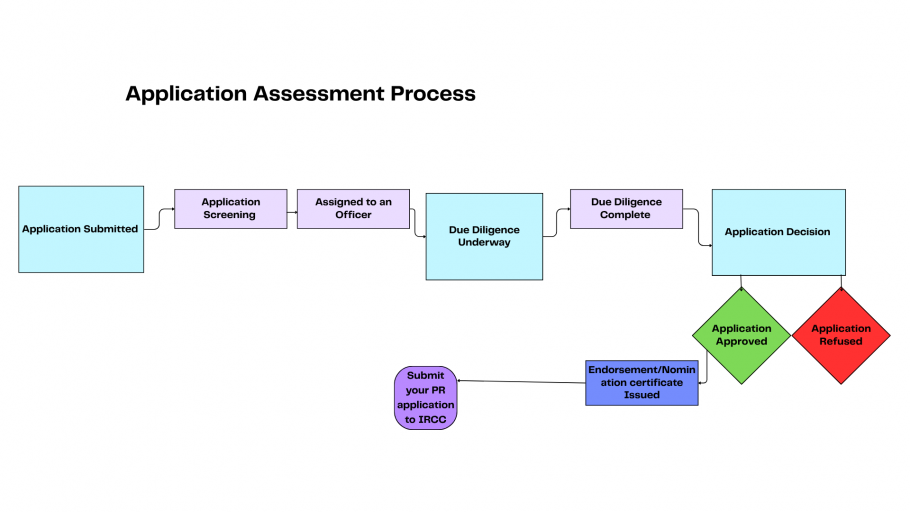
Application Submitted: Your application has been submitted via the Immigration Accelerator Portal.
Screening: Each application submitted to the Office of Immigration and Multiculturalism undergoes a screening stage to ensure the required documents are included in the application and the initial eligibility requirements are met.
Assigned to Officer: Your application has been assigned to an Immigration Program and Development Officer’s (IPDO) queue for eligibility assessment. Due diligence has not yet begun.
Updates requested, Return to Applicant: OIM has requested either the submission of a new document or changes to an existing part of the application.
Internal On Hold: Your application has been placed on hold.
Due Diligence Underway: The IPDO assigned to your application is reviewing all submitted documentation to ensure all the submitted forms are complete, and information is correct and valid.
Due Diligence Complete: The IPDO assigned to your application has reviewed your application and all supporting documents and a final recommendation has been made.
Withdrawn: Applicant has requested to withdraw their application before nomination.
Application Approved: Your application has been approved; this is the last status you will see before receiving your nomination certificate.
Refused : After reviewing an application, the applicant does not meet eligibility requirements, and/or has not complied with requests.
Rescinded/Cancelled : A provincial certificate has been issued but cancelled due to a change in circumstances.
Closed: The application has been closed; you no longer have an application in the Immigration Accelerator portal.
Expired: Application is not completed within 30 days* of the date the Invitation to apply is initiated.
A complete list of terms can be found in the Glossary.
7. How do I edit the details of my family profile on my Immigration Accelerator portal?
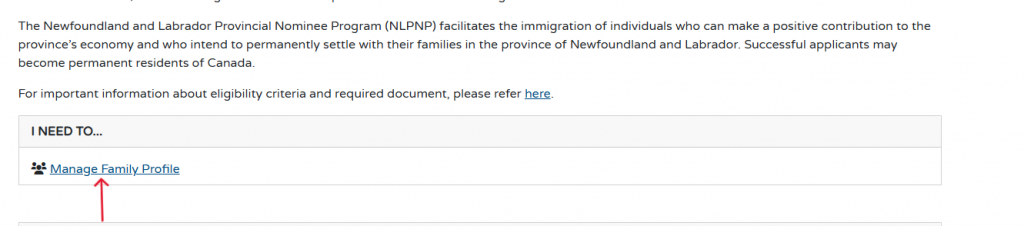
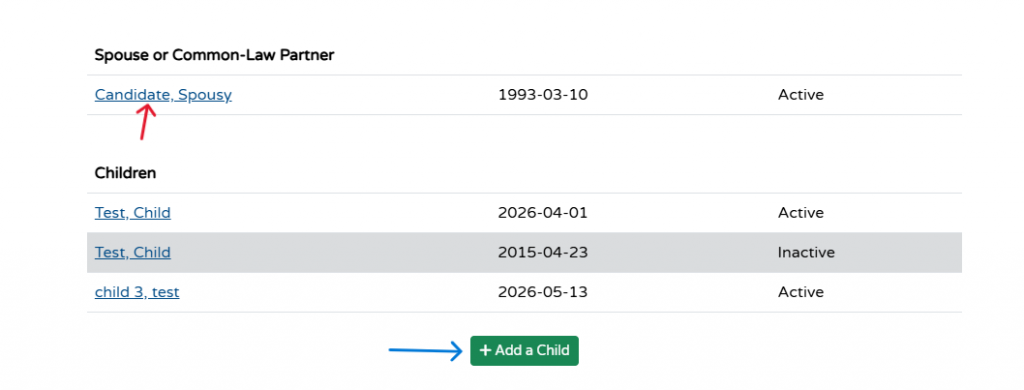
The “I Need To…” section on the portal gives you the ability to manage your family profile. To do this, you must select the underlined blue subheading “Manage Family Profile.” Clicking this will then take the candidate to their family profile where you can view the details of their spouse or common-law partner, as well as their children. To add a child, select the green button that says, “add child.” This button allows you to enter the name of your child and their birth date.
To edit details about a specific family member, either spouse or child. You can click on the name of their family members to edit their details such as their name and birthdate.
In this section, you can also view if your children/spouse are active or inactive. Active family members are considered a part of the candidate’s family profile and are considered in the application.
8. How do I know what my NOC code is?
OIM is unable to determine the NOC code of your job. To determine the NOC code of your job, you and your employer must determine the NOC code when discussing the duties and requirements of your job. If you are unsure of the Canadian government’s NOC code guidelines, more information can be found here: NOC 2021 TEER Categories and classifications of jobs.
9. How long will it take to process my application?
OIM does not currently have standard processing times for the NLPNP. For inquiries about PR application processing times, information can be found here: Check current IRCC processing times.
10. How much time do I have to submit my full application for PNP before my ITA expires?
You have 30 days* to submit a full application for NLPNP before your invitation to apply expires. It is important to note that OIM does not grant ITA extensions. For more information on ITA timeframes see: ITA Overview
11. How do I find my nomination certificate on the Immigration Accelerator Portal?
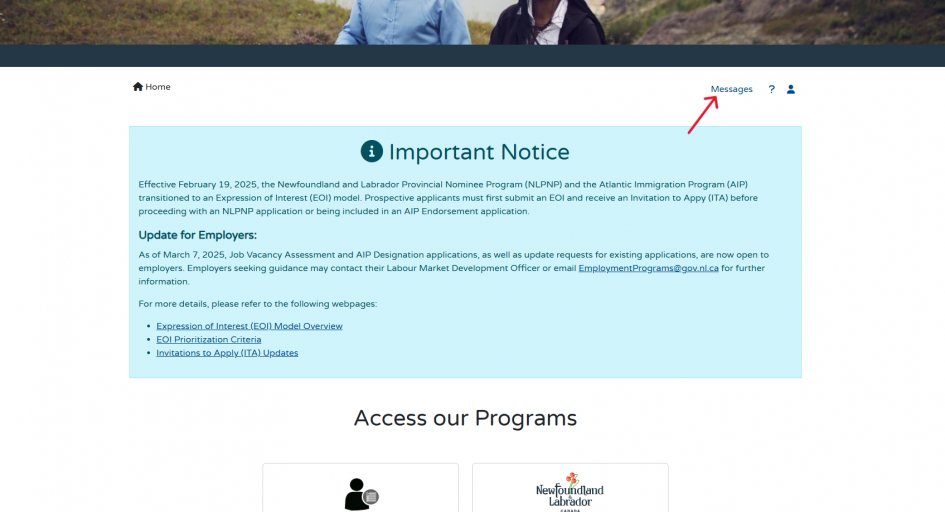
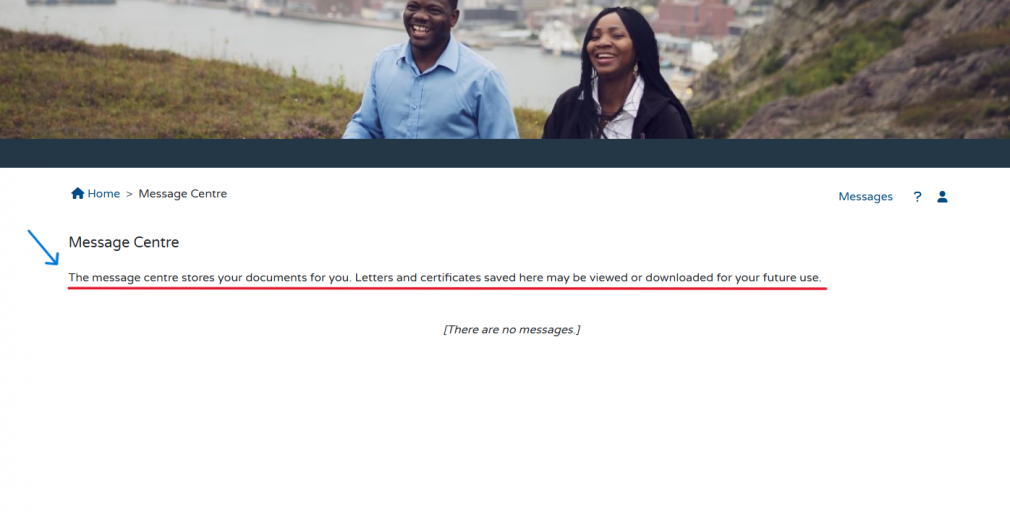
Your nomination certificate can be found in the “Message Centre” of your Immigration Accelerator dashboard.
12. How do I submit a request for a Nomination Extension Certificate?
If you require a nomination extension certificate, you are able to request this certificate through the Immigration Accelerator Portal. In your Immigration Accelerator account, under the “Applications” section, there is a heading titled “Actions.” Under this heading there is a blue button titled “Open Application.” If you click on this button, it will bring you to your PNP application page and you will be able to see all forms that you have submitted, as well as additional forms you are able to submit now you have received nomination. Under this list of forms will be a section titled “PNP Requests” where you can locate the form titled “Request for a nomination extension certificate. “You must fill out this form and then select the “Submit Application” button at the bottom of the page to submit this form to your immigration officer for processing. For more information see: Extensions to Nomination Certificates.
13. How long is my nomination certificate valid before it expires?
Your nomination certificate is valid for 6 months before it expires. Note that you may request an extension if needed. For more information on nomination certificate extensions, see: Nomination Certificate Extensions
14. What if I’m laid off after I receive my nomination?
If you are laid off after receiving your nomination, you must notify OIM as soon as possible and provide the reason for the layoff. A layoff will not automatically result in the cancellation of your nomination. However, your PR application may be placed on hold while you seek new employment. You will be expected to secure new employment with an eligible employer within approximately 4-6 weeks. If you are unable to obtain new eligible employment within this timeframe, this may result in the cancellation of your nomination and the refusal of your PR application. For more details about OIM’s policies, see: General Policies.
15. What if I’m promoted after I receive my nomination?
If your position changes after receiving your nomination (e.g., due to a promotion), you must notify our office as soon as possible. An IPDO will reassess your eligibility based on the new position. If you remain eligible, a revised nomination certificate will be issued. A promotion may also require you to apply for a change of conditions if you hold a closed work permit. We encourage you to contact your assigned IPDO before accepting a new position to ensure that the change will not affect your eligibility for the program. For more details about OIM’s policies, see: General Policies.
16. I have been nominated through the Provincial Nominee Program (PNP); but my work permit has expired. What happens now?
If you have been nominated for NLPNP and your work permit expires, first, you must inform your IPDO immediately.
If you have been nominated at the time of your work permit expiry, you are able to request a work permit support letter from OIM that will be included in your work permit extension application. Your employer will have to submit this work permit extension application on your behalf to the IRCC before your work permit expires.
If you submit a work permit extension request before the expiry date, you can continue working on implied status. If you do not submit your application before the expiry date, but do it during the 90 days restoration period, you must stop working until you hear back from IRCC, but you can stay in the country. If you submit your work permit extension application after 90 days, you are then considered out of status and must leave the country to apply for a new work permit.
For more information, see:
I applied for a new work permit. Can I stay in Canada if my work permit expires?
Restore your status and get a work permit
Work permit: Apply from inside Canada – Eligibility and requirements
17. I frequently work 30 hours per week, even though my contract is for 15 hours. Do I qualify for NLPNP?
To qualify for NLPNP Express Entry, you must have a full-time job offer with a minimum of 30 hours per week. If you only have a part-time job offer, even if you work full-time hours, you are not eligible.
For other NLPNP pathways, cases where applicants work more than 30 hours per week will be assessed on a case-by-case basis to evaluate eligibility.
18. I am an in-Canada refugee claimant, do I qualify for the NLPNP?
No. NLPNP is an economic immigration pathway to permanent residency. As a refugee claimant, you are not eligible.
19. Do I have to use a third-party, such as an immigration consultant, to apply to NLPNP?
The use of Third-Party members such as an immigration consultant is optional to apply for the NLPNP. Their use is not required.
20. Does a change in family status threaten my NLPNP process?
While you are required to update your IPDO of any changes to your family status, generally this should not threaten your NLPNP process. It is important to note that a change in family status may increase the processing time of your application.
21. How can I report a third-party representative?
If you wish to report against a Regulated Canadian Immigration Consultant (RCIC), you can do so here: Make a Complaint .
If your third-party representative is not an RCIC, you can report your concern in writing to immigration@gov.nl.ca
22. How do I know if the invite or documentation I received is genuine?
Applicants are encouraged to validate their invitations and documentations by emailing immigration@gov.nl.ca and requesting verification. If you receive a document through the Immigration Accelerator portal, you can be confident that it is authentic. If you are receiving documents from an employer or from a third-party representative, OIM recommends that you verify its authenticity by contacting immigration@gov.nl.ca.
* The application submission period has been temporarily reduced from 60 to 30 days to support timely application intake and processing within the current year
If you have additional questions regarding the NL Provincial Nominee Program (NLPNP) please contact pnp@gov.nl.ca.
Updated: September 25, 2026