

This page is a list of frequently asked questions (FAQs) about Job Vacancy Assessments (JVAs) and the employer role in the Newfoundland and Labrador Provincial Nominee Program (NLPNP). Questions 1-6 relate to JVAs, and Questions 7-9 are about the employer role in NLPNP.
In order to view the answer to the listed questions, click on the desired question and the answer will be displayed. In order to view the other categories of FAQs, please go to our General FAQ Page.
Glossary:
JVA: Job Vacancy Assessment
NLPNP: Newfoundland and Labrador Provincial Nominee Program
AIP: Atlantic Immigration Program
OIM: Office of Immigration and Multiculturalism
LMDO: Labour Market Development Officer
IRCC: Immigration, Refugees and Citizenship Canada
PR: Permanent Residence
1. How do I submit a request for JVA positions?
To submit a request for JVA positions, you must first create a profile on the Immigration Accelerator portal and submit a JVA application. Upon receipt of a positive JVA, you will be allocated a certain number of positions that you can fill with foreign workers.
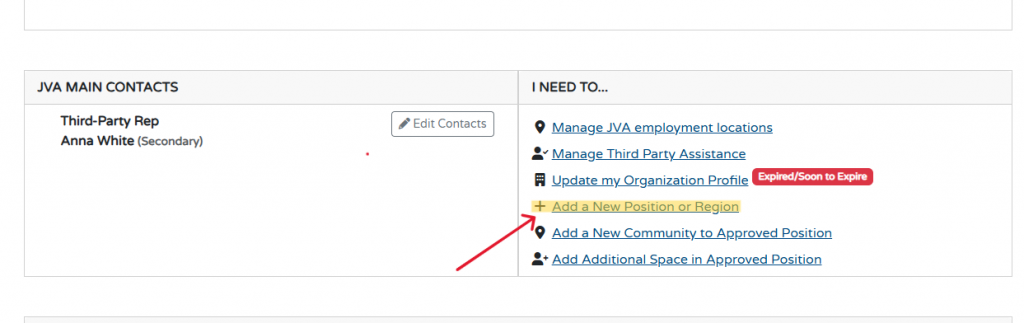
If you wish to request additional JVA positions, go to the “I Need To…” section.
The “Add a New Position or Region” section allows the organization to request a new position as part of their JVA or allows them to request a new region of operation as part of their approved JVA.
2. Who can I contact for technical support with the immigration portal/OIM website?
For technical assistance with the Immigration Accelerator Portal contact OIMDigitalSystems@gov.nl.ca
3. How long is my JVA position valid for?
Approved JVA positions are valid for one year from the date of approval.
More information on the Length of JVA approval can be found here: JVA Approval Length.
4. How do I reset my password on my Immigration Accelerator account?
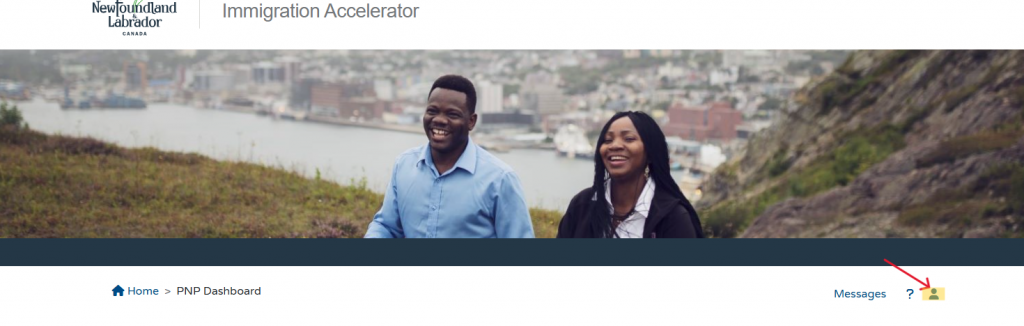
To update/reset your password, select the person icon to bring you to the “My Profile” section of the Homepage.
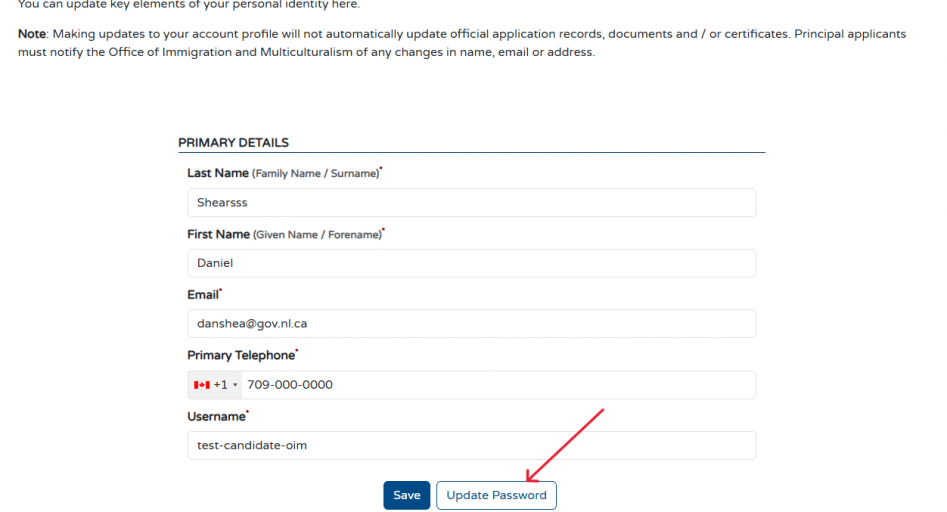
Once you open the “My Profile” section, you can click the “Update Password” button to reset your password.
5. Can I apply for a JVA and an AIP designation space for the same NOC?
No, you are not permitted to apply for a JVA and an AIP designation space for the same NOC. You must choose to apply for one or the other. Please note that after review by an LMDO, exceptions may apply but are not guaranteed.
For more information on JVAs see: Job Vacancy Assessments
For more information of employer designation see: Designation
6. How can I report Job Vacancy Assessment Fraud?
Any suspicions of fraud relating to provincial economic immigration should be sent to immigration@gov.nl.ca
7. How do I send an invite code to a prospective nominee?
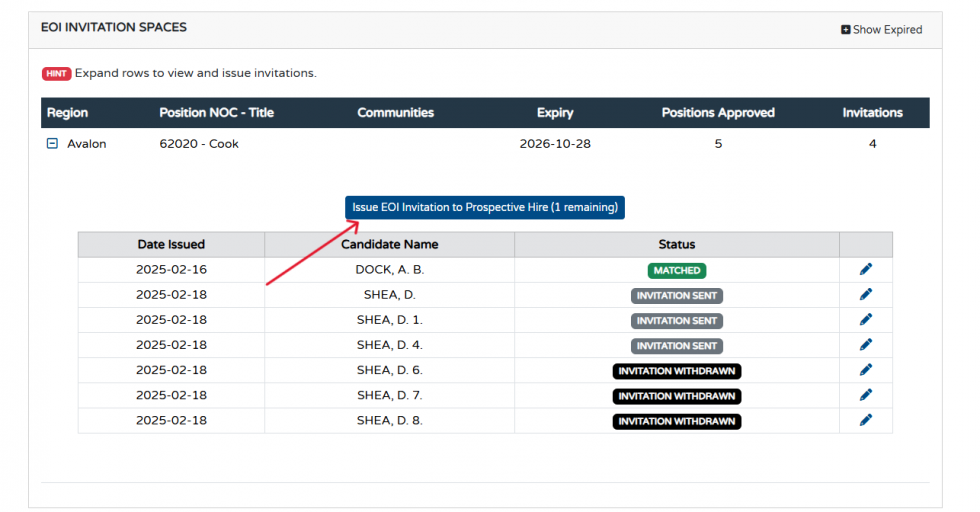
The EOI invitation spaces section allows employers to see what spaces they have available from their JVA to extend EOI invitations to employees or potential employees.
The Dashboard will indicate the number of positions available to hire workers, as well as the number of EOI invitations that the employer has sent to employees or potential employees.
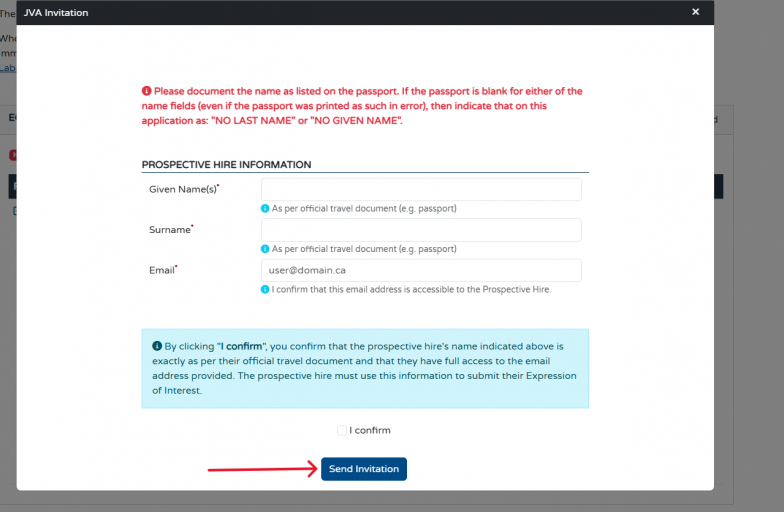
To issue an EOI invitation, employers can click on the small plus sign located next to the year of the approved position. When this icon is selected, it gives the option to “Issue EOI invitation to Prospective Hire.” This button then prompts the employer to enter the prospective hire’s given name, surname, and email to which the EOI invitation code is sent.
8. How do I withdraw an invite code sent to a prospective hire? AND am I still able to use this invite code for a new prospective hire?
The EOI invitation spaces section of the portal allows you to see what spaces your organization has available, from your AIP designation or JVA assessment, to extend EOI invitations to employees or potential employees.
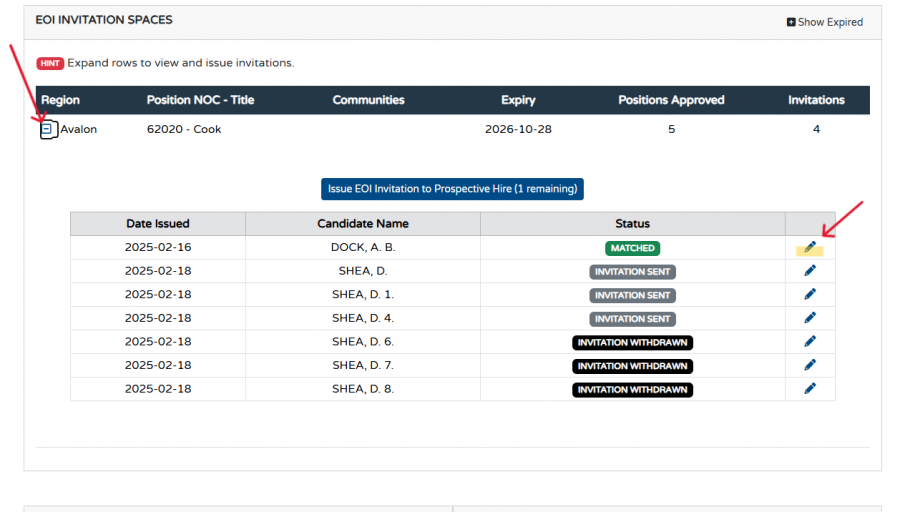
To withdraw an invitation, you can click on the small plus sign located next to the year of the approved position. This will allow you to view the EOI invitation codes that you have issued. Visible to employers, is the date the EOI Invitation code was issued, the Candidates name, and the status ie. “Invitation Sent”, “EOI Selected,” etc.
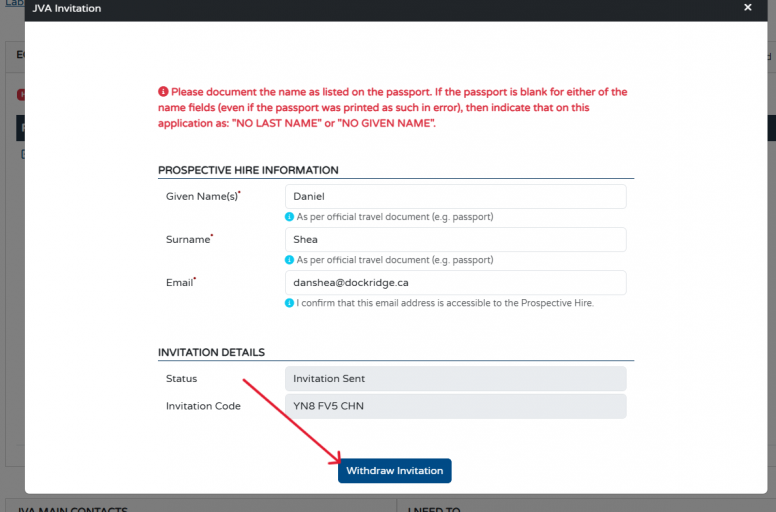
Next to the list of each EOI Invitation issued, is a pencil icon. This pencil icon allows employers to edit the name and email address of their prospective hire who has received the EOI invitation. It also gives the employer the option to “Withdraw Invitation”, thereby removing the invitation from their EOI.
If you choose to withdraw an invite code from a candidate, you are able to use the same invite code for another prospective hire, as long as you, the employer did not receive an ITA for the initial user of the code.
9. What are my next steps after my employee/prospective hire receives their nomination?
Once your employee has been nominated by NLPNP, as their employer, you must complete a submission in the IRCC Employer Portal and pay the $230 Employer Compliance Fee before they can apply for their work permit (If needed). Once your employee receives a certificate of nomination, you will also receive an email further detailing the process of supporting your employee through their PR application. The link to the IRCC Employer Portal can be found here: IRCC Employer Portal
If you have additional questions regarding Job Vacancy Assessments (JVAs) please contact immigration@gov.nl.ca.
If you have additional questions regarding the NL Provincial Nominee Program (NLPNP) please contact pnp@gov.nl.ca.
Updated: July 27, 2026